 3618199ab0
96ad0c8926...6a8a45fc4f

git log 96ad0c8926b0493d4276a39ee9bc6de6fa97bece..6a8a45fc4f698364d03b5902c1818d2acc79db22 --no-merges --oneline
6a8a45fc4 Have the AccessibilityBridge attach/detach itself to the (flutter/engine#8229)
45b19e47c Roll src/third_party/skia ba91f65f2070..7e2c0614a2fd (13 commits) (flutter/engine#8228)
1dbd2046b Moved io.flutter.embedding.engine.android package to io.flutter.embedding.android (flutter/engine#8221)
bb354363e Roll src/third_party/dart 70e3e67dd7..5e9df35a57 (45 commits)
3b19a4d30 Removed dart_plugin_tag from DEPS
d9b6629b6 Roll src/third_party/skia 4273a150f84d..ba91f65f2070 (6 commits) (flutter/engine#8225)
e88573aef Roll src/third_party/skia d7d93001ead2..4273a150f84d (1 commits) (flutter/engine#8224)
be9067cc7 Roll src/third_party/skia 37a9294d2eb9..d7d93001ead2 (2 commits) (flutter/engine#8223)
ee4abba58 Roll src/third_party/skia 2894d13a0d9b..37a9294d2eb9 (1 commits) (flutter/engine#8222)
3496156bd Roll src/third_party/skia dd0544078d05..2894d13a0d9b (33 commits) (flutter/engine#8220)
a1dcb2ea9 [ios] Set contentsScale before we commit CATransaction (flutter/engine#8218)
fa1931f6a Send macOS keyboard data to the engine (flutter/engine#8219)
45f69ac47 Plumb a reference of PlatformViewsController and AccessibilityBridge to each other (flutter/engine#8208)
7cbbdb400 libtxt: more accurate tracking of run positioning and width for justified text (flutter/engine#8214)
172810342 Add a build dependencies script for Linux desktop (flutter/engine#8160)
d764b69b2 Add docs for helpful commands to fix format (flutter/engine#8171)

The AutoRoll server is located here: https://autoroll.skia.org/r/flutter-engine-flutter-autoroll

Documentation for the AutoRoller is here:
https://skia.googlesource.com/buildbot/+/master/autoroll/README.md

If the roll is causing failures, please contact the current sheriff (liyuqian@google.com), and stop
the roller if necessary.Flutter 


Build beautiful native apps in record time
Flutter is Google’s mobile app SDK for crafting high-quality native interfaces on iOS and Android in record time. Flutter works with existing code, is used by developers and organizations around the world, and is free and open source.
Documentation
Main site: flutter.dev
For announcements about new releases and breaking changes, follow the flutter-announce@googlegroups.com mailing list.
Fast development
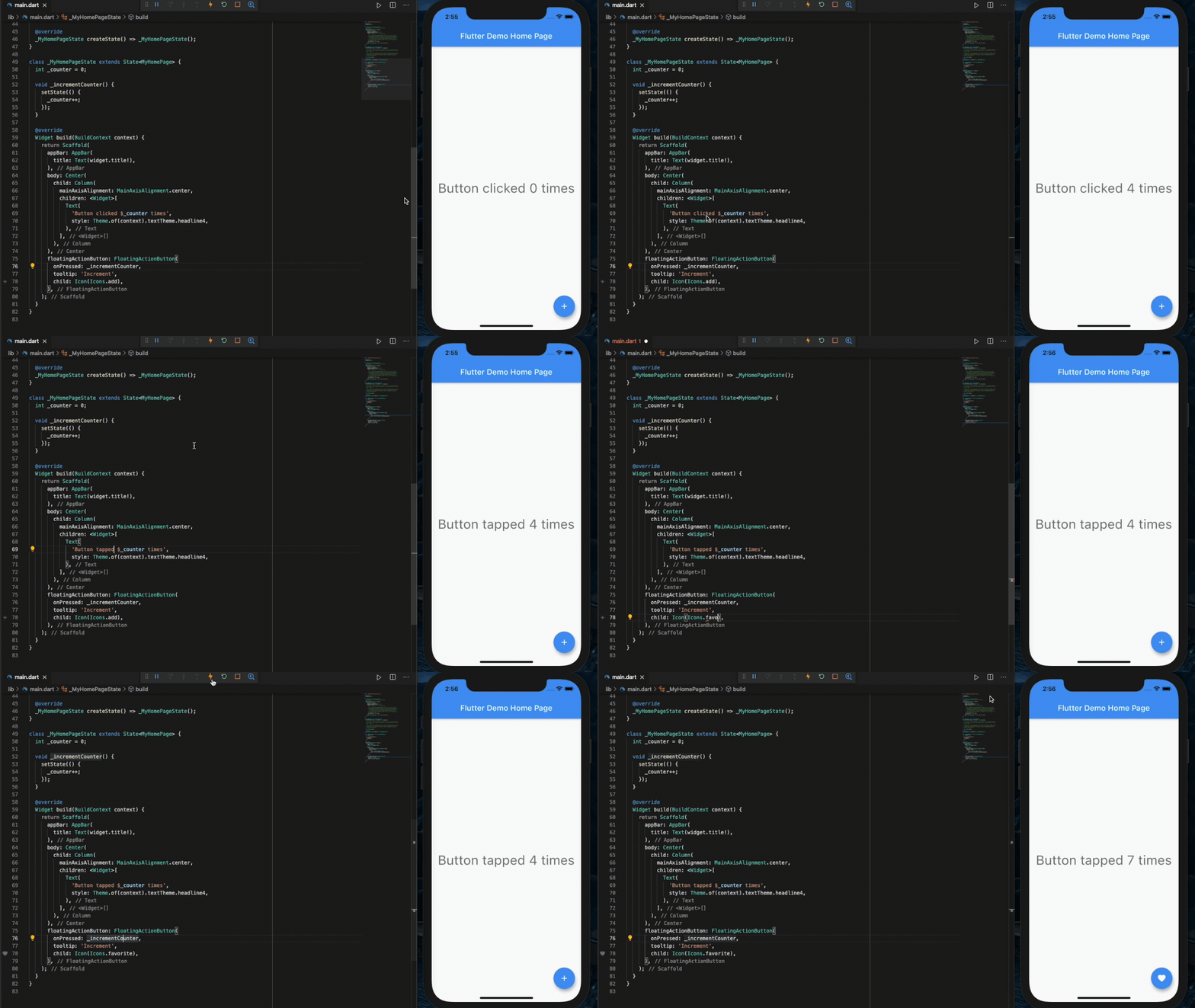
Flutter's hot reload helps you quickly and easily experiment, build UIs, add features, and fix bugs. Experience sub-second reload times, without losing state, on emulators, simulators, and hardware for iOS and Android.
Expressive and flexible UI
Quickly ship features with a focus on native end-user experiences. Layered architecture allows full customization, which results in incredibly fast rendering and expressive and flexible designs.
Delight your users with Flutter's built-in beautiful Material Design and Cupertino (iOS-flavor) widgets, rich motion APIs, smooth natural scrolling, and platform awareness.


Browse the widget catalog.
Modern, reactive framework
Easily compose your UI with Flutter's modern functional-reactive framework and rich set of platform, layout, and foundation widgets. Solve your tough UI challenges with powerful and flexible APIs for 2D, animation, gestures, effects, and more.
class CounterState extends State<Counter> {
  int counter = 0;

  void increment() {
    // Tells the Flutter framework that state has changed,
    // so the framework can run build() and update the display.
    setState(() {
      counter++;
    });
  }

  Widget build(BuildContext context) {
    // This method is rerun every time setState is called.
    // The Flutter framework has been optimized to make rerunning
    // build methods fast, so that you can just rebuild anything that
    // needs updating rather than having to individually change
    // instances of widgets.
    return Row(
      children: <Widget>[
        RaisedButton(
          onPressed: increment,
          child: Text('Increment'),
        ),
        Text('Count: $counter'),
      ],
    );
  }
}
Browse the widget catalog and learn more about the functional-reactive framework.
Access native features and SDKs
Make your app come to life with platform APIs, 3rd party SDKs, and native code. Flutter lets you reuse your existing Java/Kotlin and ObjC/Swift code, and access native features and SDKs on Android and iOS.
Accessing platform features is easy. Here is a snippet from our interop example:
Future<void> getBatteryLevel() async {
  var batteryLevel = 'unknown';
  try {
    int result = await methodChannel.invokeMethod('getBatteryLevel');
    batteryLevel = 'Battery level: $result%';
  } on PlatformException {
    batteryLevel = 'Failed to get battery level.';
  }
  setState(() {
    _batteryLevel = batteryLevel;
  });
}
Learn how to use packages or write platform channels to access native code, APIs, and SDKs.
Unified app development
Flutter has the tools and libraries to help you easily bring your ideas to life on iOS and Android. If you don't have any mobile development experience, Flutter is an easy and fast way to build beautiful mobile apps. If you are an experienced iOS or Android developer, you can use Flutter for your views and leverage much of your existing Java/Kotlin/ObjC/Swift investment.
Learn more about what makes Flutter special in the technical overview.
More resources
Join us in our Gitter chat room or join our public mailing list, flutter-dev@googlegroups.com.
How to contribute
To join the team working on Flutter, see our contributor guide.